
 徐万新之路
徐万新之路说明
CentOS 7 上安装PostgreSQL14。
开始安装
1、下载安装包
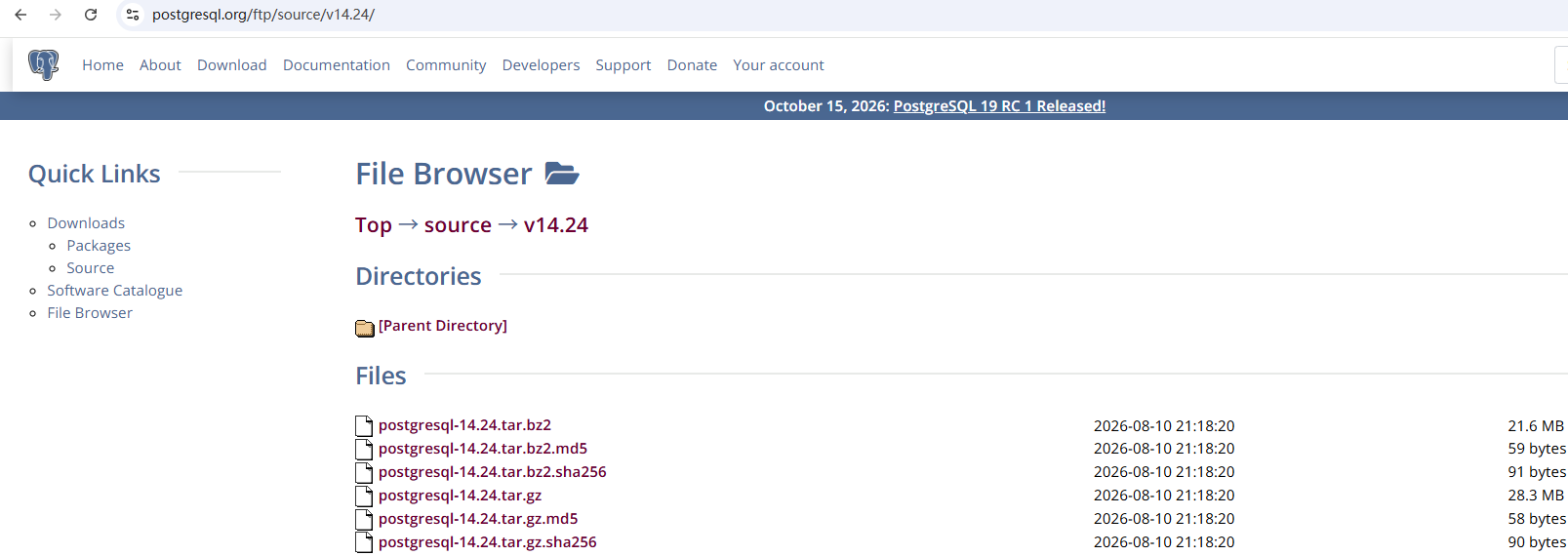
这里直接使用官网的 file browser(ftp) 下载,下载的时候需要注意,它这里将不同版本的包分为 beta、rc 和不带任何说明。建议下载最新不带任何说明的版本,因为其它版本可能会不稳定。
进去下载后会有多个包可选,个人比较喜欢 tar.gz 结尾的包。
2、上传并解压
下载之后,我们需要通过 winscp 或其它工具将包上传至服务器中,我这里是上传到 /usr/local/src 里,并解压。
# 解压
[root@localhost src]# tar xvf postgresql-14.24.tar.gz
3、安装依赖
在解压之后,我们需要将 PostgreSQL 使用到的依赖给安装上,以避免配置过程中报错。
# 安装依赖
yum -y install gcc* readline* zlib* openssl* pam* libxml2* libxslt* openldap*
4、configure
安装完依赖就需要进行 configure。configure 可以简单理解为配置安装及预检查。默认情况下,configure 后会将 PostgreSQL 安装在 /usr/local/pgsql 目录。
[root@localhost postgresql-14.24]# ./configure --prefix=/usr/local/pgsql --with-pgport=5432 --with-openssl --with-pam --with-ldap --with-libxml --with-libxslt --disable-thread-safety --with-blocksize=16 --with-wal-blocksize=16参数说明:
| 参数 | 说明 |
|---|---|
--prefix | 指定数据库安装目录,默认为 /usr/local/pgsql |
--with-pgport | 指定数据库端口号,默认为 5432 |
--with-openssl | 建立 SSL(加密) 连接的支持 |
--with-pam | 建立可插入身份验证模块的支持 |
--with-ldap | 使用 LDAP 构建支持身份验证和连接参数查找 |
--with-libxml | 安装 libxml 模块,以支持 SQL/XML |
--with-libxslt | 安装 libxslt 模块,从而使 xml2 模块能执行 xml 的 xsl 转换 |
--disable-thread-safety | 禁用客户端线程安全,可以防止 libpq 和 ECPG 程序中的并发线程安全地控制其专用连接句柄 |
--with-blocksize | 设置块的大小,单位 KB,默认值 8KB |
--with-wal-blocksize | 设置 WAL 块的大小,单位 KB,默认值 8KB |
5、安装
[root@localhost postgresql-14.24]# make6、创建用户
[root@localhost postgresql-14.24]# userdel -r postgres
[root@localhost postgresql-14.24]# groupdel postgres
[root@localhost postgresql-14.24]# groupadd postgres
[root@localhost postgresql-14.24]# useradd -g postgres postgres
[root@localhost postgresql-14.24]# passwd postgres
7、创建目录及授权
[root@localhost postgresql-14.24]# mkdir /data
[root@localhost postgresql-14.24]# chown postgres:postgres /data
[root@localhost postgresql-14.24]# chown -R postgres:postgres /usr/local/src/postgresql-14.0
[root@localhost postgresql-14.24]# chown -R postgres:postgres /usr/local/pgsql
8、配置环境变量
[root@localhost postgresql-14.24]# vim /home/postgres/.bash_profileexport PGDATA=/data
export PGHOME=/usr/local/pgsql
export PATH=$PGHOME/bin:/usr/sbin:$PATH
export LANG=en_US.utf89、初始化
[postgres@localhost ~]$ initdb -D $PGDATA -E UTF8 --locale=C -U postgres -W10、配置内核参数
[root@localhost postgresql-14.24]# vim /etc/sysctl.confkernel.shmall = 2097152
kernel.shmmax = 2147483648
kernel.shmmni = 4096
kernel.sem = 50100 64128000 50100 1280
fs.file-max = 7672460
net.ipv4.ip_local_port_range = 9000 65500
net.core.rmem_default = 1048576
net.core.rmem_max= 4194304
net.core.wmem_default= 262144
net.core.wmem_max= 1048576[root@localhost postgresql-14.24]# sysctl -p11、配置用户资源限制
[root@localhost postgresql-14.24]# vim /etc/security/limits.conf* soft nofile 131072
* hard nofile 131072
* soft nproc 131072
* hard nproc 131072
* soft core unlimited
* hard core unlimited
* soft memlock 50000000
* hard memlock 5000000012、配置数据库访问策略
[root@localhost postgresql-14.24]# vim /data/pg_hba.confhost all all 0.0.0.0/0 md513、配置数据库参数
[root@localhost postgresql-14.24]# vim /data/postgresql.conf# - Connection Settings -
listen_addresses = '0.0.0.0'
unix_socket_permissions = 0700
# - TCP settings -
tcp_keepalives_idle = 60
tcp_keepalives_interval = 10
tcp_keepalives_count = 1014、启动数据库
[postgres@localhost ~]$ pg_ctl start。